 Français
Introduction
Initially, Spring Cloud used Netflix Zuul v1 as a gateway server. However, since the release of Spring Cloud Greenwich, it is recommended to use Spring Cloud Gateway instead.
Spring Cloud Gateway comes with similar support for critical features such as URL path-based routing and endpoint protection via the use of OAuth 2.0 and OpenID Connect (OIDC).
An important difference between Netflix Zuul v1 and Spring Cloud Gateway is that Spring Cloud Gateway is based on non-blocking APIs that use Spring 5, Project Reactor, and Spring Boot 2, whereas Netflix Zuul v1 is based on blocking APIs. This means that Spring Cloud Gateway should be able to handle a larger number of simultaneous requests than Netflix Zuul v1, which is important for a gateway server through which all external traffic passes.
The following diagram shows how all external client requests go through Spring Cloud Gateway as a gateway server. Depending on the URL paths, it routes requests to the intended microservice:
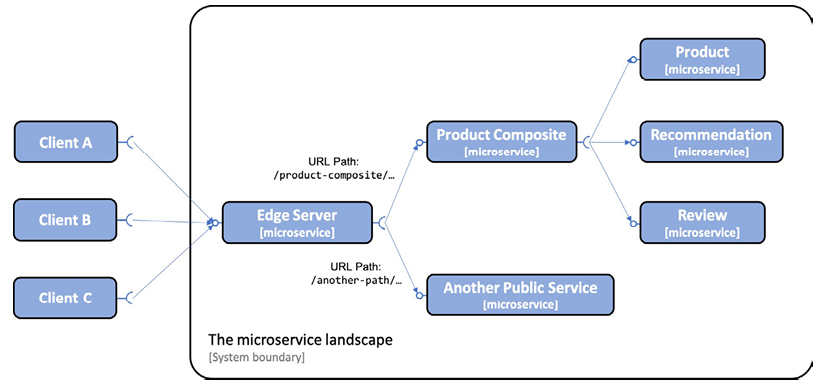
In the previous diagram, we can see how the Edge server will send external requests whose URL path starts with /product-composite/ to the Product-Composite microservice. The base services Product, Recommendation, and Review are not accessible from external clients.
To manage the configuration of a microservices system landscape, Spring Cloud contains Spring Cloud Config, which provides centralized management of configuration files based on needs.
Spring Cloud Config supports storing configuration files in a number of different backends, such as:
- A Git repository, for example, on GitHub or Bitbucket
- A local file system
- HashiCorp Vault
- A JDBC database
Spring Cloud Config allows managing configuration in a hierarchical structure. For example, we can place common parts of the configuration in a common file and microservice-specific parameters in separate configuration files.
Spring Cloud Config detects changes in configuration and sends notifications to the relevant microservices. It uses Spring Cloud Bus to transport the notifications. Spring Cloud Bus is an abstraction above Spring Cloud Stream that supports using RabbitMQ or Kafka as a messaging system for transporting ready-to-use notifications.
The following diagram illustrates the cooperation between Spring Cloud Config, its clients, a Git repository, and Spring Cloud Bus:
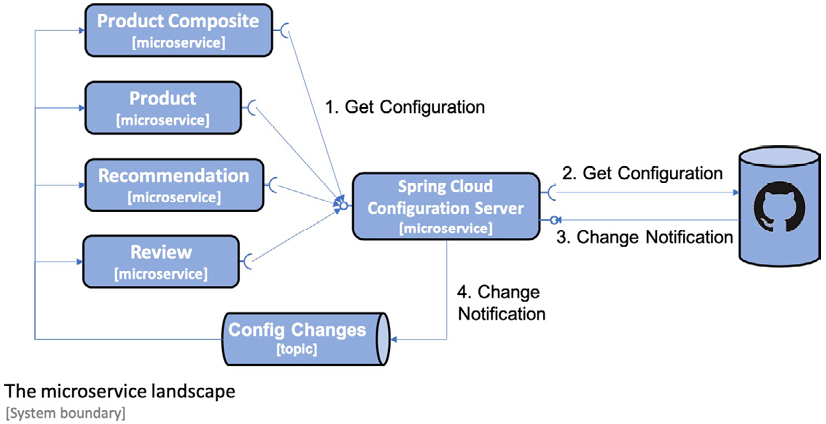
This diagram shows that when a microservice starts up, it requests its configuration from the configuration server. The configuration server obtains the configuration from a configured Git repository.
The Git repository can be configured to send notifications to the configuration server when Git commits are pushed to the Git repository.
The configuration server publishes modification events using Spring Cloud Bus. The microservices affected by the modification retrieve their updated configuration from the configuration server.
Finally, Spring Cloud Config also supports encrypting sensitive information in the configuration, such as credentials.
Adding Spring Gateway
In this section, we'll see how the gateway server is added to the system and how it affects how external clients access the public APIs exposed by the microservices.
All incoming requests will now be routed via the Edge server, as shown in the following diagram:
As we can see from the previous diagram, external clients send all their requests to the Edge server. The Edge server can route incoming requests based on the URL path. For example, requests whose URL starts with /product-composite/ are routed to the product composite microservice, and a request whose URL starts with /eureka/ is routed to the Netflix Eureka-based discovery server.
Configuring the Gateway as a gateway server is straightforward and can be accomplished by following these steps:
- Create a Spring Boot project using Spring Initializr.
- Add a dependency on spring-cloud-starter-gateway.
- To be able to locate microservice instances via Netflix Eureka, also add the spring-cloud-starter-netflix-eureka-client dependency.
- Add the Edge server project to the settings.gradle file:
include ':spring-cloud:gateway'
- Add a Dockerfile with the same content as for the microservices.
- Add the Edge server to our Docker Compose files:
 gateway:
environment:
- SPRING_PROFILES_ACTIVE=docker
build: spring-cloud/gateway
mem_limit: 512m
ports:
- "8080:8080"
Given that the edge server will handle all incoming traffic, we will move the composite service status check for the product composite to the edge server.
Next, you can add configuration for routing rules and more. As there is a lot to configure, this is covered in a separate section.
Adding a Composite Status Check
With an Edge server in place, external health check requests should also pass through the gateway server. Therefore, the composite status check that checks the status of all microservices has been moved from the composite service to the Edge server.
The following have been added to the Edge server:
- The HealthCheckConfiguration class has been added, which declares the reactive health contributor:
   @Bean
  ReactiveHealthContributor healthcheckMicroservices() {

    final Map<String, ReactiveHealthIndicator> registry =
      new LinkedHashMap<>();

    registry.put("product",           () ->
      getHealth("http://product"));
    registry.put("recommendation",    () ->
      getHealth("http://recommendation"));
    registry.put("review",            () ->
      getHealth("http://review"));
    registry.put("product-composite", () ->
      getHealth("http://product-composite"));

    return CompositeReactiveHealthContributor.fromMap(registry);
  }

  private Mono<Health> getHealth(String baseUrl) {
    String url = baseUrl + "/actuator/health";
    LOG.debug("Setting up a call to the Health API on URL: {}",
      url);
    return webClient.get().uri(url).retrieve()
      .bodyToMono(String.class)
      .map(s -> new Health.Builder().up().build())
      .onErrorResume(ex ->
      Mono.just(new Health.Builder().down(ex).build()))
      .log(LOG.getName(), FINE);
  }
- The main application class, GatewayApplication, declares a WebClient.Builder bean to be used by the health indicator implementation as follows:
   @Bean
  @LoadBalanced
  public WebClient.Builder loadBalancedWebClientBuilder() {
    return WebClient.builder();
  }
With a health check in place for the Edge server, we're ready to look at the configuration that needs to be set up for Spring Cloud Gateway.
Configuring a Spring Cloud Gateway
When it comes to configuring a Spring Cloud Gateway, the most important thing is to configure routing rules. We also need to configure a few other elements in the configuration:
-
Since Spring Cloud Gateway will use Netflix Eureka to find the microservices to which it will route traffic, it needs to be configured as an Eureka client in the same way you did in the git (sidebar).
-
Configure Spring Boot Actuator for use in development:
 management.endpoint.health.show-details: "ALWAYS"
management.endpoints.web.exposure.include: "*"
- Configure logging levels so we can see logging messages from interesting parts of the internal processing in Spring Cloud Gateway, for example, how it decides where to route incoming requests to:
 logging:
  level:
    root: INFO
    org.springframework.cloud.gateway.route.
        RouteDefinitionRouteLocator: INFO
    org.springframework.cloud.gateway: TRACE
Routing rules can be configured in two ways: programmatically, using a Java DSL, or through configuration. Using a Java DSL to configure routing rules programmatically can be useful in cases where the rules are stored in an external storage, such as a database, or are given at runtime, for example, via a RESTful API or a message sent to the gateway. In more static use cases, I find it more convenient to declare the routes in the configuration file, src/main/resources/application.yml. Separating routing rules from Java code allows updating routing rules without having to deploy a new version of the microservice.
A route is defined by the following:
- Predicates, which select a route based on information contained in the incoming HTTP request
- Filters, which can modify both the request and/or the response
- A destination URI, which describes where to send a request
- An ID, which is the name of the route
Routing requests to the composite API:
If we want to route incoming requests whose URL path starts with /product-composite/ to our product-composite service, we can define a routing rule as follows:
 spring.cloud.gateway.routes:
- id: product-composite
  uri: lb://product-composite
  predicates:
  - Path=/product-composite/**
Some points to note from the previous code are:
id: product-composite: The name of the route is "product-composite".uri: lb://product-composite: If the route is selected by its predicates, the request will be routed to the service that is named "product-composite" in the discovery service, Netflix Eureka. Thelb://protocol is used to instruct Spring Cloud Gateway to use the client-side load balancer to look up the destination in the discovery service.predicates: - Path=/product-composite/**is used to specify which requests this route should match.**matches zero or more elements in the path.
- id: product-composite-swagger-ui
  uri: lb://product-composite
  predicates:
  - Path=/openapi/**
If a request is sent to the Edge server with a URI that starts with /openapi/, it will be routed to the product-composite service. This can be achieved by defining an appropriate routing rule in the Spring Cloud Gateway configuration.
Routing requests to the Eureka server's API and web page:
To allow for a clear separation between the Eureka server's API and web page, Eureka exposes both an API and a web page for its clients. To properly route incoming requests, we need to set up routes as follows:
- Requests sent to the Edge server with a path starting with
/eureka/apishould be treated as a call to the Eureka API. - Requests sent to the Edge server with a path starting with
/eureka/webshould be treated as a call to the Eureka web page.
The API request will be routed to http://${app.eureka-server}:8761/eureka. The routing rule for the Eureka API looks like this:
 - id: eureka-api
  uri: http://${app.eureka-server}:8761
  predicates:
  - Path=/eureka/api/{segment}
  filters:
  - SetPath=/eureka/{segment}
The {segment} part of the Path value matches zero or more elements in the path and will be used to replace the {segment} part in the SetPath value.
Web page requests will be routed to http://${app.eureka-server}:8761. The web page will load several web resources, such as .js, .css, and .png files. These requests will be routed to http://${app.eureka-server}:8761/eureka. The routing rules for the Eureka web page look like this:
 - id: eureka-web-start
  uri: http://${app.eureka-server}:8761
  predicates:
  - Path=/eureka/web
  filters:
  - SetPath=/

- id: eureka-web-other
  uri: http://${app.eureka-server}:8761
  predicates:
  - Path=/eureka/**
From the previous configuration, we can take the following notes. The ${app.eureka-server} property is resolved by the Spring property mechanism based on the active Spring profile:
- When running the services on the same host without using Docker, for example, for debugging purposes, the property will be translated to localhost using the default profile.
- When running the services as Docker containers, the Netflix Eureka server runs in a container with the DNS name eureka. Therefore, the property will be translated to eureka using the Docker profile.
The relevant parts of the application.yml file are:
 app.eureka-server: localhost
---

spring.config.activate.on-profile: docker
Routing Requests with Predicates and Filters
Configuration for routing requests with predicates and filters in Spring Cloud Gateway.
Route to Return 200 OK for Calls to i.feel.lucky:8080/headerrouting
 - id: host_route_200
  uri: http://httpstat.us
  predicates:
  - Host=i.feel.lucky:8080
  - Path=/headerrouting/**
  filters:
  - SetPath=/200
Route to return 418 I'm a teapot for calls to im.a.teapot:8080/headerrouting.
 - id: host_route_418
  uri: http://httpstat.us
  predicates:
  - Host=im.a.teapot:8080
  - Path=/headerrouting/**
  filters:
  - SetPath=/418
Route to return 501 Not Implemented for all other calls to headerrouting.
 - id: host_route_501
  uri: http://httpstat.us
  predicates:
  - Path=/headerrouting/**
  filters:
  - SetPath=/501
This code demonstrates how to configure routes with predicates and filters in Spring Cloud Gateway. We have three different routes for specific hostnames and paths to headerrouting. We use the Host predicate to select requests with specific hostnames and the SetPath filter to set the desired HTTP code in the request path. This allows us to route requests to the correct response based on the predicate and filter criteria defined in the routes.
To test the routing rules, you can follow these steps:
- Make a call to the product composite API via the Edge server.
- Monitor the Edge server's log output to see which routes are being matched and how requests are being routed.
docker-compose logs -f --tail=0 gateway
-To call the product composite API through the Edge server.
curl http://localhost:8080/product-composite/1
- Wait for a normal response from the product composite API.
- Look for the following information in the Edge server's log output:
- It forwards the request to http://b8013440aea0:8080/product-composite/1.
Calling the Eureka API via the Edge server
- To call the Eureka API via the Edge server and see which instances are currently registered on the discovery server.
curl -H "accept:application/json" localhost:8080/eureka/api/apps -s | jq -r .applications.application[].instance[].instanceId
- Wait for a response listing the available instances.
- Open the Eureka web page in a web browser using the URL http://localhost:8080/eureka/web.
- Verify that the instances reported by the API and the Eureka web page match.